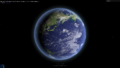
様々なノイズを使い、パーティクルを動かして画像が形成されるアニメーションを作っていこうと思います。このテクニックをベースに、他のものと組み合わることで、さらに面白いものができると思います。基本的なものですが、備忘録を兼ねて紹介しようと思います。
shaderが使える中級者向け?の内容となります。
Demo1(Curl Noise): https://misora.main.jp/partclenoise_testA/
Demo2(Simplex noise): https://misora.main.jp/partclenoise_testB/
1.下準備(ShaderMaterialでPointMeshを作成)
パーティクルの絵となる画像(512×512)を作成します(image.png)。正方形である必要はありません、PlaneGeometryとともにおのおので調整ください。

three.js(Partcleのplaneを作成)
/*three.js*/
import Vertex from "./vertex.glsl";
import Fragment from "./fragment.glsl";

~

const geometry = new THREE.PlaneGeometry(10, 10, 200, 200);// 10x10 Square

const material = new THREE.ShaderMaterial({
  uniforms : {
    uPixelRation : {value:Math.min(window.devicePixelRatio, 2.0)},
    uResolution: {value: new THREE.Vector2(window.innerWidth, window.innerHeight)},
    uTime: { value: 0.0},//animationに使用
    uSize: { value: 0.04},//Partcleサイズ
    uStep: { value: 1.00},//影響度
    uInfluence: { value: 10.0},//影響度
    udisplayment: {value:new THREE.TextureLoader().load("image.png")},//画像
  },
  vertexShader:Vertex,
	fragmentShader: Fragment,
  blending: THREE.NormalBlending,
  //side:THREE.DoubleSide,
  transparent:true,
});

const plane = new THREE.Points(geometry, material);
plane.position.set(0, 0, 0);
scene.add( plane );
vertex.glsl
/*vertex.glsl*/
uniform float uPixelRation;
uniform float uSize;
uniform float uTime;
uniform float uInfluence;
uniform float uStep;

varying vec2 vUv;
varying float vPointSize;

void main() {
  vUv = uv;

 vec4 worldPosition = modelMatrix * vec4( position, 1.0 );
  vec4 mvPosition =  viewMatrix * worldPosition;
  gl_Position = projectionMatrix * mvPosition;

  // camera position to size point
  vec3 cameraPos = cameraPosition.xyz; // カメラの位置を取得
  float dist = length(position - cameraPos);
  vPointSize = uSize * uPixelRation * 1000.0 / dist;

  gl_PointSize = vPointSize;
}
fragment.glsl
/*fragment.glsl*/
uniform sampler2D udisplayment;
uniform vec2 uResolution;
uniform float uTime;
uniform float uCount;
varying vec2 vUv;

void main()
{

  vec4 color = texture2D(udisplayment, vUv);

  if (color.a < 0.05) {
	 	discard;
	}
  // 出力
  gl_FragColor = vec4(color);
}正方形のPlaneにイメージをパーティクルで表示できたと思います。ShaderMaterialのuSizeの値を変更することでパーティクルの粒1つのサイズを変更することができます。
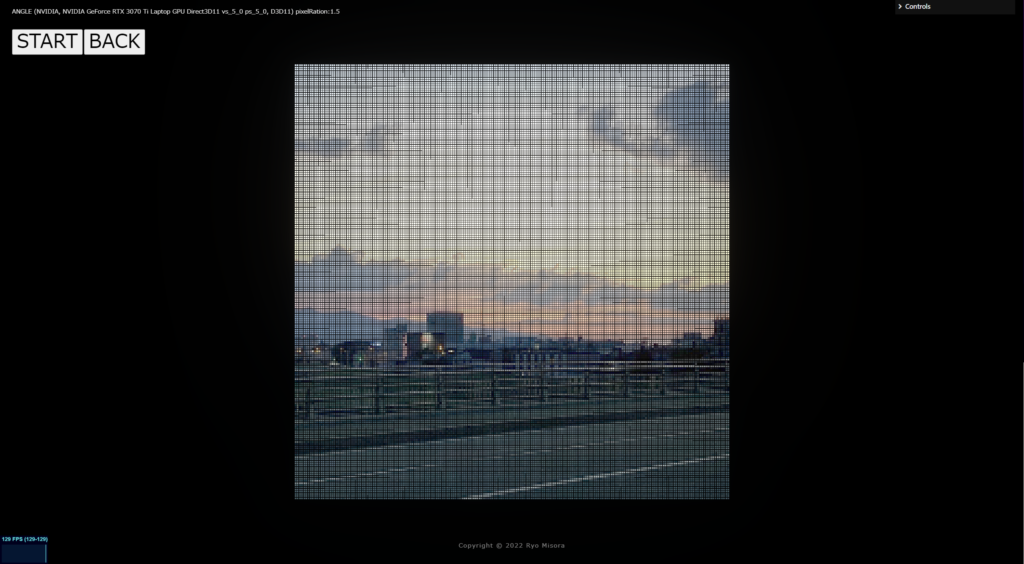
アニメーションさせるためのスッチングを作成します。アニメーションにGSAPを使います。npmでインストールしましょう。

HTML側で、document.getElementByIdに対応するタグを作成ください。
import gsap from "gsap";let switchA = false;
/*PLAY*/
document.getElementById("Play-Btn").addEventListener("click", () => function(){
if(!switchA){
switchA = true;
let Hold = 0;
gsap.to((material), 1.6,{ //1.6sのアニメーション
onStart: function() {},
onUpdate: function() {
const add = (1.0 * this.progress() - Hold) * (-1) ;
Hold = 1.0 * this.progress();
material.uniforms.uInfluence.value += add * 10;//to 10 =>0
material.uniforms.uStep.value += add;// to 1 => 0
},
onRepeat: function() {},
onComplete:function(){},
});
}
}());
/*BACK*/
document.getElementById("Stop-Btn").addEventListener("click", () => function(){
if(switchA){
switchA = false;
let Hold = 0;
gsap.to((material), 1.0,{ //1.0sのアニメーション
onStart: function() {},
onUpdate: function() {
const add = (1.0 * this.progress() - Hold) ;
Hold = 1.0 * this.progress();
material.uniforms.uInfluence.value += add * 10;//to 0 => 10
material.uniforms.uStep.value += add;//to 0 => 1
},
onRepeat: function() {},
onComplete:function(){},
});
}
}());2.様々なNoise(ノイズ)
様々なノイズをパーティクルに乗せていこうと思います。以下のサイトを引用・参考にさせていただきました。おのおのコピーしてみてください。
thebookofshaders.com

yuntaRobo’s Lab.

patriciogonzalezvivo/GLSL-Noise.md

2.1 WhiteNoise(RandomNoise)

vertex.glsl
/*vertex.glsl*/
uniform float uPixelRation;
uniform float uSize;
uniform float uTime;
uniform float uInfluence;
uniform float uStep;
varying vec2 vUv;
varying float vPointSize;

float random (vec2 st) {
    return fract(sin(dot(st.xy,vec2(12.9898,78.233)))*43758.5453123);
}
float animation(float f){
  float speed = 1.0;
  return sin(f * 6.283 + uTime * speed) * 0.5 + 0.5;
}
float whitenoise(vec2 uv){
  float w = animation(random(uv));
  return w;
}

void main() {
  vUv = uv;

  // ★White noise
  float pp = whitenoise( vec2( position.x, position.y ));
  vec3 p = vec3( position.x, position.y, position.z + pp* 10.0 );
  vec4 worldPosition = modelMatrix * vec4( position * (1.0 - uStep ) + p * uStep , 1.0 );

  vec4 mvPosition =  viewMatrix * worldPosition;
  gl_Position = projectionMatrix * mvPosition;

  // camera position to size point
  vec3 cameraPos = cameraPosition.xyz; // カメラの位置を取得
  float dist = length(position - cameraPos);
  vPointSize = uSize * uPixelRation * 1000.0 / dist;

  gl_PointSize = vPointSize;
}
2.2 Block noise

vertex.glsl
/*vertex.glsl*/
uniform float uPixelRation;
uniform float uSize;
uniform float uTime;
uniform float uInfluence;
uniform float uStep;
varying vec2 vUv;
varying float vPointSize;

float random (vec2 st) {
    return fract(sin(dot(st.xy,vec2(12.9898,78.233)))*43758.5453123);
}
float animation(float f){
  float speed = 1.0;
  return sin(f * 6.283 + uTime * speed) * 0.5 + 0.5;
}
float blocknoise_(vec2 uv)
{
	uv *= 2.0;
	vec2 i_uv = floor(uv);
	float b = animation(random(i_uv));
	return b;
}

void main() {
  vUv = uv;

  // ★Block noise
  float pp = blocknoise_( vec2( position.x, position.y ));
  vec3 p = vec3( position.x, position.y, position.z + pp * 10.0  );
  vec4 worldPosition = modelMatrix * vec4( position * (1.0 - uStep ) + p * uStep , 1.0 );

  vec4 mvPosition =  viewMatrix * worldPosition;
  gl_Position = projectionMatrix * mvPosition;

  // camera position to size point
  vec3 cameraPos = cameraPosition.xyz; // カメラの位置を取得
  float dist = length(position - cameraPos);
  vPointSize = uSize * uPixelRation * 1000.0 / dist;

  gl_PointSize = vPointSize;
}
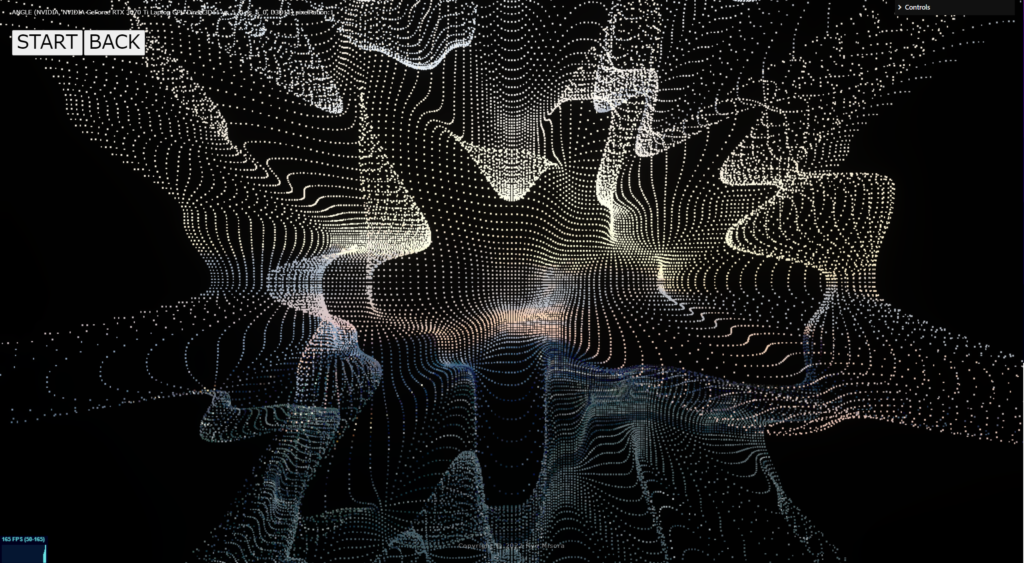
2.3 Value noise
vertex.glsl
/*vertex.glsl*/
uniform float uPixelRation;
uniform float uSize;
uniform float uTime;
uniform float uInfluence;
uniform float uStep;
varying vec2 vUv;
varying float vPointSize;

float random (vec2 st) {
    return fract(sin(dot(st.xy,vec2(12.9898,78.233)))*43758.5453123);
}
float animation(float f){
  float speed = 1.0;
  return sin(f * 6.283 + uTime * speed) * 0.5 + 0.5;
}
float interpolation(float f)
{
	return f * f * f * (f * (6.0 * f - 15.0) + 10.0);
}
float Valuenoise_(vec2 uv)
{
	uv *= 1.0;//細かくできる
	vec2 i_uv = floor(uv);
	vec2 f_uv = fract(uv);
	float f1 = animation(random(i_uv + vec2(0.0, 0.0)));
	float f2 = animation(random(i_uv + vec2(1.0, 0.0)));
	float f3 = animation(random(i_uv + vec2(0.0, 1.0)));
	float f4 = animation(random(i_uv + vec2(1.0, 1.0)));
	float v = mix(
		mix(f1, f2, interpolation(f_uv.x)),
		mix(f3, f4, interpolation(f_uv.x)),
		interpolation(f_uv.y));
	return v;
}

void main() {
  vUv = uv;

  // ★Value noise
  float pp = Valuenoise_( vec2( position.x, position.y ));
  vec3 p = vec3( position.x, position.y, position.z + pp * 10.0 );
  vec4 worldPosition = modelMatrix * vec4( position * (1.0 - uStep ) + p * uStep , 1.0 );

  vec4 mvPosition =  viewMatrix * worldPosition;
  gl_Position = projectionMatrix * mvPosition;

  // camera position to size point
  vec3 cameraPos = cameraPosition.xyz; // カメラの位置を取得
  float dist = length(position - cameraPos);
  vPointSize = uSize * uPixelRation * 1000.0 / dist;

  gl_PointSize = vPointSize;
}
2.4 Perlin Noise

patriciogonzalezvivo/GLSL-Noise.md
vertex.glsl
/*vertex.glsl*/
uniform float uPixelRation;
uniform float uSize;
uniform float uTime;
uniform float uInfluence;
uniform float uStep;
varying vec2 vUv;
varying float vPointSize;

~copy-paste~

void main() {
  vUv = uv;

  // ★Perlin Noise
  float pp = cnoise( vec2(position.x + uTime, position.y + uTime) );
  vec3 p =  vec3( position.x, position.y , position.z + pp );
  vec4 worldPosition = modelMatrix * vec4( position * (1.0 - uStep ) + p * uStep, 1.0 );

  vec4 mvPosition =  viewMatrix * worldPosition;
  gl_Position = projectionMatrix * mvPosition;

  // camera position to size point
  vec3 cameraPos = cameraPosition.xyz; // カメラの位置を取得
  float dist = length(position - cameraPos);
  vPointSize = uSize * uPixelRation * 1000.0 / dist;

  gl_PointSize = vPointSize;
}
2.5 Simplex noise

patriciogonzalezvivo/GLSL-Noise.md
vertex.glsl
/*vertex.glsl*/
uniform float uPixelRation;
uniform float uSize;
uniform float uTime;
uniform float uInfluence;
uniform float uStep;
varying vec2 vUv;
varying float vPointSize;

~copy-paste~

void main() {
  vUv = uv;

  // ★simplex noise
  float pp = simplexnoise( vec2(position.x + uTime, position.y + uTime) );
  vec3 p =  vec3( position.x, position.y, position.z + pp );
  vec4 worldPosition = modelMatrix * vec4( position * (1.0 - uStep ) + p * uStep, 1.0 );

  vec4 mvPosition =  viewMatrix * worldPosition;
  gl_Position = projectionMatrix * mvPosition;

  // camera position to size point
  vec3 cameraPos = cameraPosition.xyz; // カメラの位置を取得
  float dist = length(position - cameraPos);
  vPointSize = uSize * uPixelRation * 1000.0 / dist;

  gl_PointSize = vPointSize;
}
2.6 Curl Noise

glsl-curl-noise
vertex.glsl
/*vertex.glsl*/
uniform float uPixelRation;
uniform float uSize;
uniform float uTime;
uniform float uInfluence;
uniform float uStep;
varying vec2 vUv;
varying float vPointSize;

~copy-paste~

void main() {
  vUv = uv;

  // ★curl noise
  vec3 pp = vec3( position.x + uTime, position.y, position.z );
  vec3 p = curlNoise( pp );
  //vec4 worldPosition = modelMatrix * vec4( position * (1.0 - uStep ) + p * uStep, 1.0 );
  vec4 worldPosition = modelMatrix * vec4( position * (1.0 - uStep ) + p * uInfluence, 1.0 );

  vec4 mvPosition =  viewMatrix * worldPosition;
  gl_Position = projectionMatrix * mvPosition;

  // camera position to size point
  vec3 cameraPos = cameraPosition.xyz; // カメラの位置を取得
  float dist = length(position - cameraPos);
  vPointSize = uSize * uPixelRation * 1000.0 / dist;

  gl_PointSize = vPointSize;
}
2.7 Fractional Brownian motion

patriciogonzalezvivo/GLSL-Noise.md
vertex.glsl
/*vertex.glsl*/
uniform float uPixelRation;
uniform float uSize;
uniform float uTime;
uniform float uInfluence;
uniform float uStep;
varying vec2 vUv;
varying float vPointSize;

~copy-paste~

void main() {
  vUv = uv;

  // ★ Fractional Brownian motion
  float pp = fbm( vec2(position.x + uTime, position.y + uTime) );
  vec3 p =  vec3( position.x + pp, position.y + pp, position.z + pp);
  vec4 worldPosition = modelMatrix * vec4( position * (1.0 - uStep ) + p * uStep, 1.0 );

  vec4 mvPosition =  viewMatrix * worldPosition;
  gl_Position = projectionMatrix * mvPosition;

  // camera position to size point
  vec3 cameraPos = cameraPosition.xyz; // カメラの位置を取得
  float dist = length(position - cameraPos);
  vPointSize = uSize * uPixelRation * 1000.0 / dist;

  gl_PointSize = vPointSize;
}
3.完成!
簡単でしたね!
よく使うNoiseテクニックをまとめてみました。地面だったり液体だったりと擬似的に見せるのに役立つものばかりだと思います。通常、Fragmentでマテリアル作りによく使いますが、今回はvertextで使用する感じで紹介しました。Noiseの詳細については、引用に載せたBookOfShaderにまとまっているのでぜひ興味のある方はご覧ください。
thebookofshaders.com

Demo2(Simplex noise)のコードは、Simplex noiseの出力をアレンジたものになります。
/*vertex.glsl*/

~

 // ★simplex noise o o
  vec3 p = vec3(simplexnoise(vec2(position.x,uTime)), simplexnoise(vec2(position.y, uTime)), position.z );
  vec4 worldPosition = modelMatrix * vec4( position * (1.0 - uStep ) + p * uStep * 5.0, 1.0 );
以上、基本的なものですが、備忘録を兼ねての紹介でした! これからNoiseを多用する人の参考になれば嬉しいです。